
We are currently living in the "noisy phase" of Artificial Intelligence.
Everywhere you look, products are adding chat windows, "magic" buttons, and empty text fields waiting for a prompt. While Generative AI (GenAI) is transformative for creation, it has inadvertently introduced a new problem in product design: Cognitive Friction. We are asking our users to type more, think more, and declare their intention over and over again.
The golden age of product management won't be defined by our ability to talk to our software. It will be defined by how often we don't have to.
This is where Predictive AI comes in. While GenAI is the talented writer in the room, Predictive AI is the seasoned executive assistant who knows what you need before you ask for it. The future of successful products isn't about adding more interactive features; it's about harnessing data to move from "Reactive Design" to "Anticipatory Design."
The Fundamental Difference
| Generative AI | Predictive AI |
|---|---|
| Waits for your prompt | Anticipates your needs |
| Needs explicit instructions | Learns from behavioral patterns |
| Adds interaction steps | Removes friction entirely |
| Creates on demand | Acts before you ask |
Beyond the Click
Traditional product design is fundamentally reactive. Software passively waits for the user to input a command. Consider a typical workflow:
That's three steps of friction to accomplish a Job-To-Be-Done. Each click is a micro-decision. Each micro-decision is a cognitive load. And cognitive load is the silent killer of the user experience.
Anticipatory Design flips this model on its head. It uses historical data patterns and real-time signals to predict this intention and execute it automatically. We don't just personalize content; we predict the next required action for the user.
A Real-World Example
If your telemetry data shows that User A logs in every Friday at 4:55 PM and immediately navigates to the same "Weekly Sales Report," why make them click for it?
A predictive interface recognizes the context:
The result? This specific dashboard pre-loads as the homepage. No clicks. No navigation. No friction. The interface adapts to the probable intent.
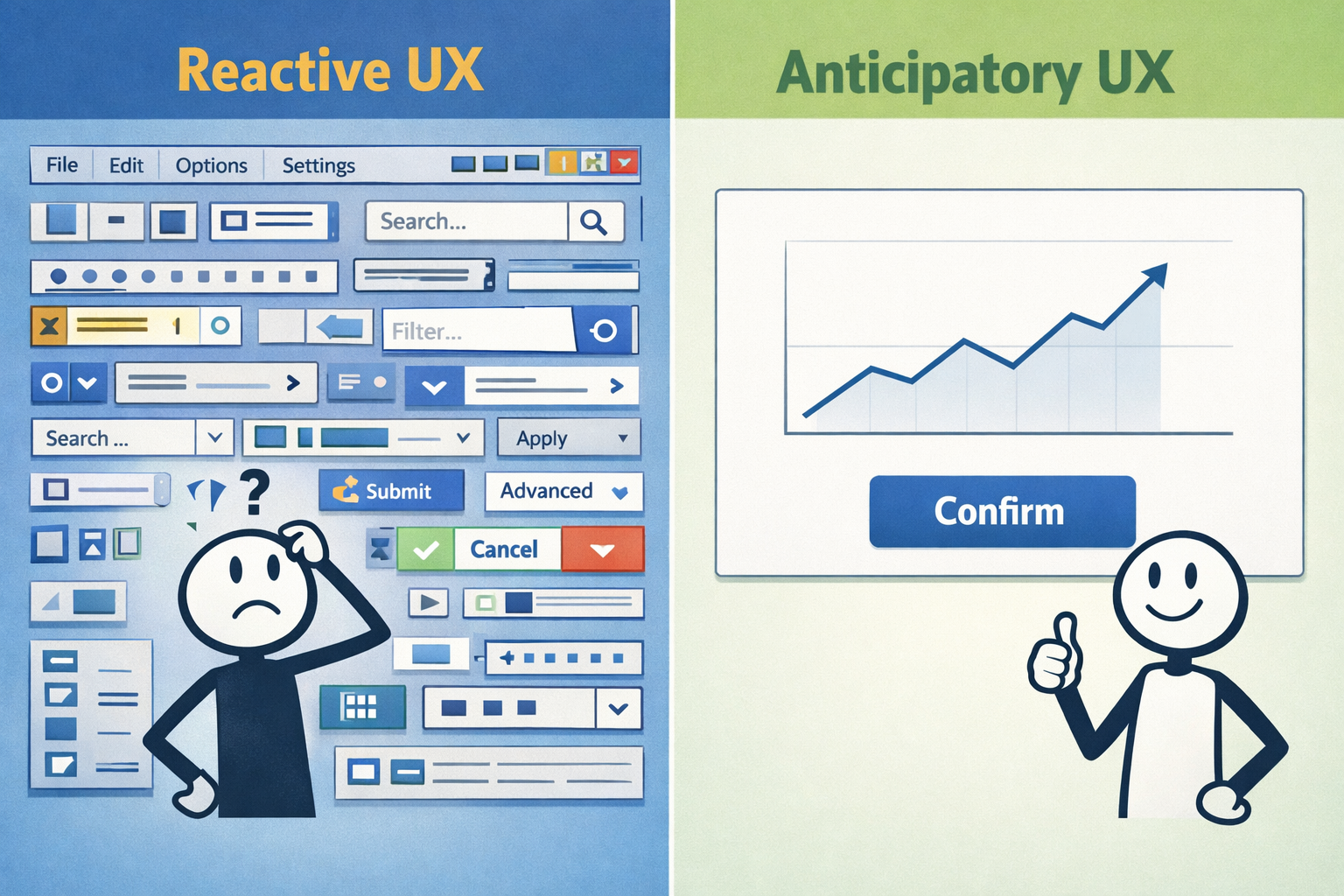
Dynamic Happy Paths
The second major unlock of Predictive AI is moving away from static user flows. Right now, most products treat every new user roughly the same way. A CTO with 20 years of experience gets the same 15-step onboarding "wizard" as a junior marketing intern.
That's inefficient. And frankly, it's insulting to both users.
By using predictive modeling, we can analyze initial signals to score the user's likelihood and dynamically modify the product experience in real-time.
Signals That Matter
@enterprise.com or @gmail.com?Two Paths, One Product
High Technical Probability Score? The product detects this and skips straight past the GUI tutorial, dropping the user directly into the API documentation and developer settings. No hand-holding. No condescending tooltips. Just the tools they came for.
Low Technical Probability Score? The product launches a guided walkthrough complete with visual cues, progress indicators, and contextual help bubbles. Every step explained. Nothing assumed.
We use inference to determine the optimal "happy path" for this specific individual in real-time. The product molds to the user—not the other way around.
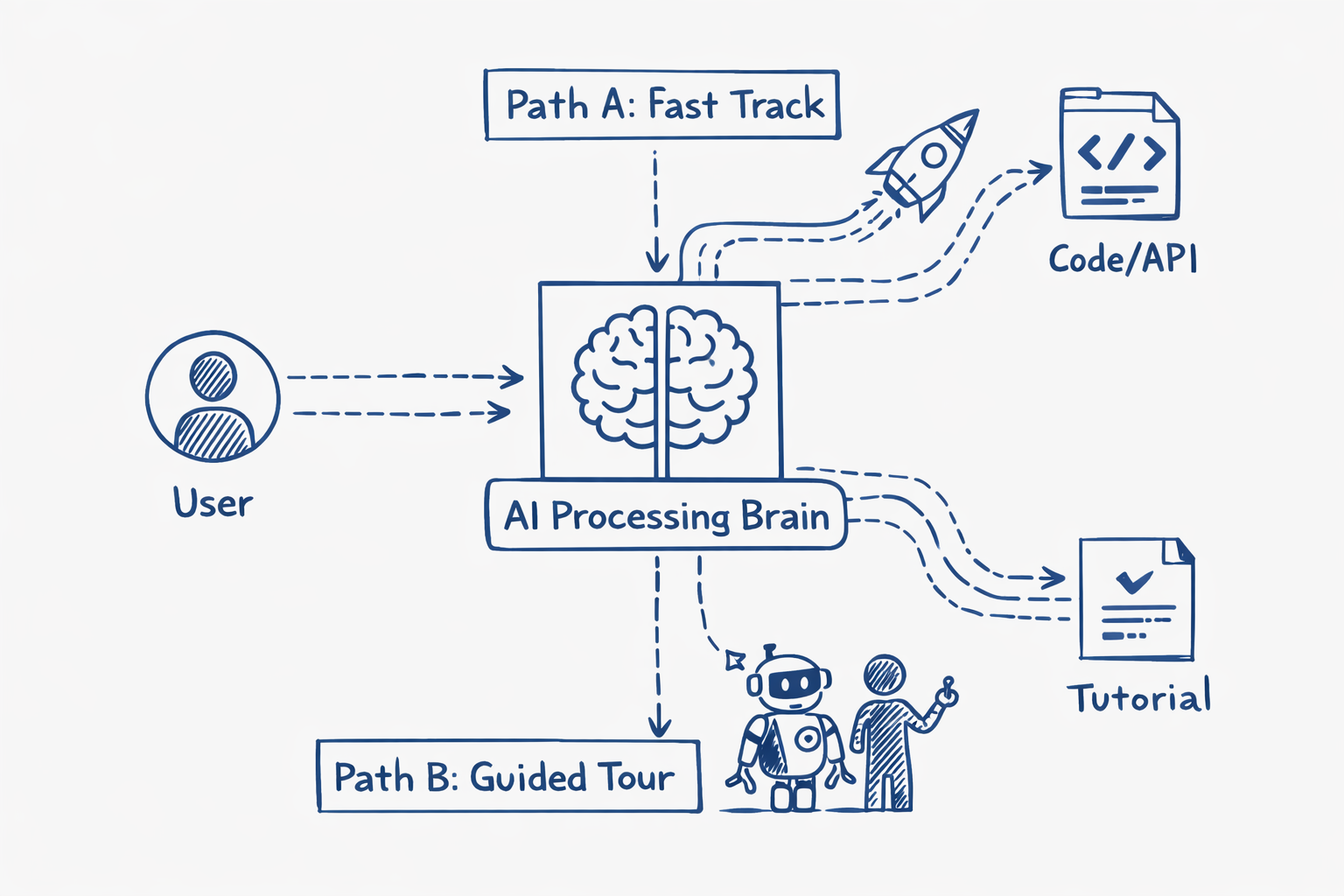
The Best UI is No UI
The goal of a Product Engineer isn't just to build things that work; it's to reduce the cognitive load required to extract value.
Here's the uncomfortable truth:
The most powerful software of the next decade will seem almost invisible. It will actively clear the path ahead of the user before they even take a step. No prompts. No assistants. No "How may I assist you today?"
Just value, delivered silently.
The Bottom Line
We've spent the past two years obsessing over how to make AI talk to us. The next decade will be defined by AI that doesn't need to.
Stop building tools that wait for instructions. Start building tools that understand context.
The winners won't be the products with the smartest chatbots. They'll be the ones you barely notice using—because they've already done the work for you.